Impressive presentation using pdf and pythonWhat is LaTeX beamer class?
The Beamer class is used to make presentation in LaTeX. This gives you the power of regular LaTeX with great math rendering and a easy support of vector graphics into your presentation. Beamer class presentations appear very structured when compared to the common PowerPoint presentation in my view.
This small article does not aim to learn anybody how to use beamer but merely to present to examples which can be hacked. Underneath each of pictures the code and the PDF is presented.
Two recent presentations made with Beamer
In this fall I made two presentation using Beamer. One for physics students about to pick the subject for the bachelor project and one to present a topic of choice for everyone interested.

Download presentation: roterende-vand.pdf 16.9 mb (24 pages)
See texcode: roterende-vand.tex.html
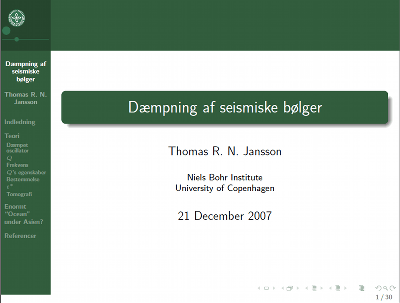
Download presentation: attenuation.pdf 2.8 mb (30 pages)
See texcode: attenuationweb.tex.html
Getting started
The installation should be fairly easy – at least it is on Linux:
root@bohr:~# aptitude install latex-beamer
This will install the documentation called beameruserguide.pdf as well in the path:
root@bohr:~# locate beameruserguide.pdf
/usr/share/doc/latex-beamer/beameruserguide.pdf.gz
The documentation can however also be downloaded on the internet: beameruserguide.pdf
I study at the university of Copenhagen and would like to use the logo of the faculty in my slides. A good friend of mine, Nanna B Karlsson, gave me the colors and the logo for a style which look very nice and natural KU. The logo can be downloaded in several formats from the page:
http://www.ku.dk/kommunikation/designmanual/download.html
The primary part of using beamer is to load the class and themes in the preamble of the LaTeX document:
\documentclass{beamer}[10]
\usepackage{pgf}
\usepackage{beamerthemesplit}

\definecolor{kugreen}{RGB}{50,93,61}
\definecolor{kugreenlys}{RGB}{132,158,139}
\definecolor{kugreenlyslys}{RGB}{173,190,177}
\definecolor{kugreenlyslyslys}{RGB}{214,223,216}
\setbeamercovered{transparent}
\mode<presentation>
\usetheme[numbers,totalnumber,compress,sidebarshades]{PaloAlto}
\setbeamertemplate{footline}[frame number]

  \usecolortheme[named=kugreen]{structure}
  \useinnertheme{circles}
  \usefonttheme[onlymath]{serif}
  \setbeamercovered{transparent}
  \setbeamertemplate{blocks}[rounded][shadow=true]

\logo{\includegraphics[width=1.5cm]{billeder/logo}}
\title{Dæmpning af seismiske bølger}
\author{Thomas R. N. Jansson}
\institute{Niels Bohr Institute \\ University of Copenhagen}
\date{21 December 2007}
The second important part is to create the slides using frame.
\frame { \frametitle{Enormt ``Ocean'' under Asien?}
\begin{block}{Artiklen}
Lawrence, J. F., and M. E. Wysession,
\textbf{Seismic evidence for subduction-transported water in the lower mantle},
Earth's Deep-Water Cycle, AGU Monograph, \textbf{2006}, 251-261.
\end{block}
Jeg har valgt denne artikel som eksempel, da den viser spændende lidt kontroversiel del af dæmpnings tomografi.
}
I hope this very short introduction creates some interest for beamer – the learning curve might be a little steeper but in the long run using beamer pays off. Further reading could be: beameruserguide.pdf
Presenting with impressive
In the article Impressive presentation using pdf and python I am showing how to present this beamer presentation using impressive as seen in video


Hello friend…nice presentation format. When compiling the TeX code on this machine, I got the following errors…
Mange takk…
! LaTeX Error: Command \textbrokenbar unavailable in encoding OT1.
See the LaTeX manual or LaTeX Companion for explanation.
Type H for immediate help.
…
l.35 }
? x
No pages of output.
Transcript written on dansk.log.
It looks as a encoding problem. I am using special danish characters only found in iso-8859-15 or UTF-8. See if removing these characters will solve the problem. If this does not help try to load a package to make LaTeX read these characters correctly::
\usepackage[utf8]{inputenc}
or
\usepackage[latin1]{inputenc}
Beautiful layout, many thanks! I’ve just used this for my Masters presentation.
Thank you very much for the color scheme! It is exactly what i kept searching for!
Thank you very much for presenting your outstanding presentations!
Nice Greetings from the Czech Republic!
Pavel
Thanks a lot for the share, dude. It looks awesome and it is pretty straighforward to use. I am preparing a presentation using your template and looks great.
Citizen of the World!
Thank you for sharing.
Sir,
I am using linux OS , i written my presentation in beamer now my question ia how to run this code in windows.
Shasi: Install latex for windows. Back when I used Windows for TeX I used MiKTeX.
I from Mexico and I study Physic, I will show this format to my friends!
Great presentation theme!!
Thanks a lot. Hello This is Vimal Baghel from India. Kindly tell me how to display the title of each slide on the top of the slide?
Hi Vimal
As I have also written in the example you should use the “\frametitle{Title of the slide}” command:
By the way I am happy to hear that you liked it. 🙂
Hi
Thanks alot
it’s very usfull for me.
Very nice presentation and thanks a lot for updation.
I would like to change green color to Yellow in your presentation. How can i accomplish this. Can any one help me?
Hi Rajesh. Just change the definecolor lines I have given in the preamble. The values are in RGB format, so just use a online RGB color picker to find what suits you. An example: http://www.colorpicker.com
Hi Thomas,
nice presentation. I’ve been using it now for quite some time. But one tiny little thing still annoys me and thats the missing frame number in the footline. I read a workaround for Warsaw theme (http://texblog.net/latex-archive/plaintex/beamer-footline-frame-number/) but it doesnt apply for PaloAlto, I tried it. When I try: \setbeamertemplate{footline}[frame number] the whole footline is overwritten and disappers but then there is a frame number.
Do you know a workaround for this? Stefan K (in the Warsaw workaround) looked into the beameroutertheme.sty and used information from their, but how can I transfer this workaround for PaloAlto?
Hi Niko
As you can probably tell from the date it is has been a while since I has worked on this, so I honestly can really tell without digging into it again from scratch. If you do find a solution please let me know as it would be nice to know if I was to use the template again.
Kind regards
Thomas
Dear Thomas,
That’s amazing!
I would like ask you about how to put some transitions in each slides as you did.
Could you help me about it, please?
Thanks,
Noor